Connect Shopify to Bizmitra and stop entering the same sale twice.
Bizmitra imports your Shopify products, customers and orders, turns a paid order into a sales invoice and receipt, turns a refund into a credit note, and pushes stock back to your store — then carries the accounting through to Tally.
Built for Indian businesses selling on Shopify — GST invoicing, HSN, e-invoicing and an onward path into TallyPrime.
The manual work
Stop managing Shopify data by hand.
A Shopify store is a good place to sell and a poor place to run a business from. The storefront does not keep your books, does not know what is in your warehouse, and does not file your GST. So somebody bridges the gap — usually by re-typing it.
Every item on this list is a place where two systems hold the same fact and depend on a person to keep them equal. The integration removes the person from that loop — not the control.
Orders are re-entered
A sale closes in Shopify, then somebody types it into the accounting system as an invoice — with the same customer, the same items and a new chance to get it wrong.
Stock is updated twice
Warehouse stock moves in one system and the storefront quantity is corrected by hand later, which is how overselling happens.
Payments are matched manually
Money arrives against an order, and someone works out which invoice it settles.
Refunds are tracked on the side
A refund is issued on the store, and the credit note against the original invoice is remembered, or it is not.
Customer records drift apart
The store has one version of the customer and the ledger has another.
Month-end becomes reconciliation
Two sets of numbers are compared line by line to find where they stopped agreeing.
How the integration works
Shopify sells. Bizmitra runs the business. Tally keeps the books.
Three systems, each doing the job it is good at, with Bizmitra in the middle holding the operational truth. Shopify and Tally never talk to each other directly — and any page that tells you otherwise is describing a different product.
- Customers place and pay for orders
- Refunds are issued to the buyer
- Product and customer records are created
- Every change raises a webhook
- Orders become sales orders
- Paid orders become invoices and receipts
- Refunds become credit notes
- Stock, warehouses, purchasing and GST
- Stock levels are pushed back to the store
- Sales invoices and receipts
- Credit and debit notes
- Payments, journals and contra
- Exchanged through a Bizmitra add-on in your Tally
The Shopify connection runs on Bizmitra Connect, the same integration framework behind every other Bizmitra connector.
What actually syncs
Every entity, every direction, in one table.
Integrations usually say "two-way sync" and leave you to find out which half is missing. This is the whole surface — what moves, which way it moves, and what it turns into on the Bizmitra side.
| Data | Shopify → Bizmitra | Bizmitra → Shopify | What it becomes in Bizmitra |
|---|---|---|---|
| Products | Supported Created and updated | Supported Sent back to the store | A product in your inventory, matched to the store item on SKU so it is updated rather than duplicated. |
| Customers | Supported Created and updated | Supported Sent back to the store | A customer with its own party ledger, ready to be billed against. |
| Orders | Supported Created, updated, cancelled | Not applicable | A sales order — a numbered ERP document in your financial year, against the customer ledger and the resolved stock items. |
| Payments | Supported When the order is paid | Not applicable | The sales order becomes a sales invoice, and a receipt is posted against it. |
| Refunds | Supported When a refund is created | Not applicable | A credit note posted against the invoice that order was billed as. |
| Stock levels | Not applicable | Supported Available quantity | Bizmitra holds the stock position across your warehouses and pushes the available quantity to your Shopify location. |
Why orders only travel one way: Shopify is the system of record for orders and payments. Bizmitra reflects them; it does not write orders back into your store, because two systems both claiming to own an order is how data gets corrupted. Stock is the mirror image — Bizmitra owns it, so it flows outward.
Order to accounting
What happens to one order, from checkout to your books.
The four documents stay separate and reference each other, exactly as an accountant would expect. That separation is what makes partial invoicing, returns and clean reconciliation possible later.
-
A Shopify order arrives
Order placed
It is written as a sales order with its own voucher number in your financial year, against the customer ledger and the stock items it resolves to. Nothing is posted to your accounts yet — a sales order is not an accounting document.
Sales Order -
Shopify reports the payment
Order paid
The sales order is converted into a sales invoice, and a receipt is posted against that invoice. The sale and the money both land in your books in the right order.
Sales Invoice + Receipt -
A refund is created on the store
Refund issued
A credit note is posted against the invoice that order was billed as. Stock is only restored if the refund actually carries returned line items — a money-only refund does not put goods back in your warehouse.
Credit Note -
Everything is a real ERP entry
Books stay current
Ledgers, GST, stock movements and reports are built from posted documents, not from a spreadsheet someone maintains. From here it can be pushed onward into Tally.
Ledgers · GST · Reports
You choose when the invoice is raised — at payment, at order, or only when you convert it yourself — and whether receipts post automatically. Read how Shopify orders work in Bizmitra.
Products & inventory
One catalogue, one stock position.
Your Shopify catalogue and your Bizmitra inventory describe the same goods. Keeping them linked is what makes the stock number on your storefront mean something.
- Matched on SKU. Products are paired on SKU in both directions, so syncing updates the record that exists instead of creating a second one.
- Stock moves outward only. Bizmitra holds the position across your warehouses and pushes the available quantity to your store.
Shopify and Tally
Your Shopify sales, in the Tally company your accountant already uses.
If your books live in TallyPrime, this is the part that matters. Bizmitra does not ask you to leave Tally, and it does not pretend Shopify can write to Tally on its own.
Shopify syncs with Bizmitra. Bizmitra exchanges vouchers with TallyPrime through a Bizmitra add-on loaded into your own Tally — so the documents raised from your store orders reach your Tally company without exporting XML or re-keying vouchers.
Orders, payments and refunds happen here.
Turns them into sales orders, invoices, receipts and credit notes — GST-correct, with HSN codes and your own voucher numbering.
A Bizmitra TDL add-on loaded into your TallyPrime handles the exchange. Nothing to re-key, and no XML to generate yourself.
Your accountant opens the same company they always have, with the store's sales already in it.
Want to see this run on your own store?
Inside Bizmitra
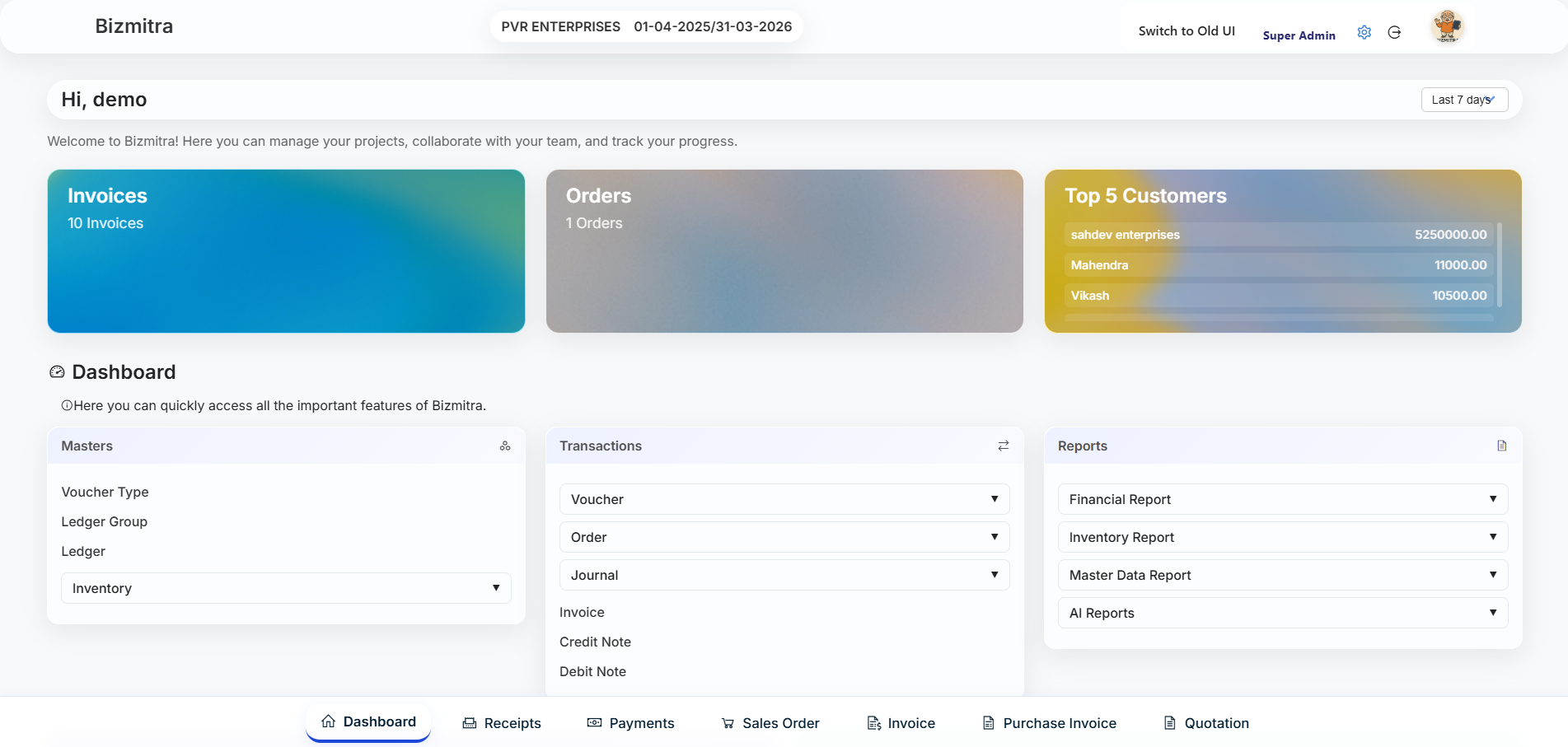
Your store's orders land in a real ERP, not a reporting tab.
Once an order is imported it behaves like any other document in Bizmitra — it can be edited, printed, reported on, and carried into your accounts.
What changes
The same store, with and without the connection.
No claim of zero effort or perfect automation — just a shorter list of things a person has to remember to do.
- Orders are re-entered into the accounting system
- Stock is corrected on the storefront by hand
- Payments are matched to invoices manually
- Refunds and credit notes are tracked separately
- Customer records exist twice, in two shapes
- Month-end starts with reconciling two systems
- Orders arrive as sales orders, already numbered
- Stock is held in Bizmitra and pushed to the store
- A paid order raises its own invoice and receipt
- A refund posts a credit note against that invoice
- Customers carry a party ledger you can bill against
- The books are built from posted documents as you go
Who this is for
Where the integration earns its place.
D2C brands scaling past manual entryDirect-to-consumer
You launched on Shopify and the order count has outgrown a spreadsheet. Orders, invoices and stock need to be in one system before hiring another person to re-type them starts looking reasonable.
Retail businesses selling online and offlineRetail + online
The shop floor and the storefront draw from the same stock. Holding that position in Bizmitra and pushing quantities to Shopify keeps the website from selling something the store already sold.
Businesses that keep their books in TallyTally-based accounting
Your accountant works in TallyPrime and is not going to change. Shopify sales reach Tally through Bizmitra as proper vouchers, so nobody has to export, clean and import a file every week.
Wholesale and B2B alongside a Shopify storeMixed channels
Online retail is one channel among several. Purchasing, warehouses and B2B invoicing live in the ERP, with the Shopify channel feeding into the same inventory and the same ledgers.
Multi-warehouse operationsMultiple locations
Stock sits across branches and warehouses. Bizmitra holds the full picture and sends the storefront the number that is actually available to sell.
Reliability
You can see what synced, and what didn't.
An integration you cannot inspect is one you have to trust blindly. Every sync is a job with a state, and the failures are visible rather than quiet.
Authorised through OAuth
You approve the app from your own Shopify admin. Bizmitra never asks for your store password, and you can withdraw access from Shopify at any time.
Signature-verified webhooks
Every incoming event is checked against its Shopify signature before it is processed. An unsigned or tampered request is rejected.
Protected against duplicates
Shopify can redeliver an event. A repeated payment event finds the invoice that already exists instead of raising a second one.
How synchronization works end to end — imports, webhooks, retries and connection health.
Customer data & privacy — what Shopify customer data the integration uses and how it is handled.
Documentation
Understand how Shopify and Bizmitra work together.
The detail behind everything above — written against the shipped integration, including the parts that are conditional or one-directional.
How a store order becomes a sales order, then an invoice and receipt — and when stock actually moves.
The exact matching rule, and the two fields Bizmitra deliberately never copies.
Why stock only travels outward, and the one case where Bizmitra refuses to act.
When a refund puts goods back in your warehouse — and when it correctly does not.
The real architecture, and why there is a step in the middle.
Imports, webhooks, retries, and how duplicate events are discarded.
Pricing
Priced on the volume you actually do.
Plans are set by your monthly Shopify order volume and the number of people using the ERP.
| Plan |
Starter
$29 /month
|
Most popular Growth
$59 /month
|
Scale
$129 /month
|
Enterprise
Custom
|
|---|---|---|---|---|
| Best for | New and small stores | Growing stores outgrowing plug-in apps | High-volume operations | Multi-brand and multi-branch |
| Shopify orders / month | Up to 500 | Up to 2,000 | Up to 10,000 | Unlimited |
| ERP users included | 2 | 5 | 10 | Custom |
| Core ERP | Inventory, CRM and purchasing | Everything in Starter | Everything in Growth | Everything in Scale |
| Also included | Tally sync, dashboards and reports | Multi-warehouse and automation | Priority order sync | Dedicated onboarding, SLA and custom integrations |
| Get started | Apply for early access | Apply for early access | Apply for early access | Apply for early access |
Prices in USD, billed monthly. Need more orders or users on one plan? Add-ons scale with you, so a single busy month does not force you up a tier. Final launch pricing is confirmed when the Shopify App goes live. You can also see full Bizmitra pricing.
Questions
Shopify and Bizmitra, answered.
It is a direct connection between your Shopify store and your Bizmitra account. Once you authorise the app, Bizmitra imports your products, customers and orders, and keeps listening for changes through Shopify webhooks. A paid order becomes a sales invoice and receipt in Bizmitra, and a refund becomes a credit note — without anyone re-typing it.
By default Bizmitra converts the order into a sales invoice and posts a receipt against it, so the sale and the money both land in your books. You can change when the invoice is raised — at order, at payment, or only when you convert it yourself. The guide "How Shopify orders work with Bizmitra" covers each mode and when stock moves.
Yes. A refund becomes a posted credit note against the invoice that order was billed as. Stock is only restored when the refund actually carries returned line items — a money-only refund does not put goods back into your inventory. The refunds guide works through both cases.
Yes, and the shape of it matters. Shopify does not talk to Tally. Shopify syncs with Bizmitra, and Bizmitra exchanges vouchers with TallyPrime through a Bizmitra TDL add-on loaded into your own Tally. Sales invoices, receipts and credit notes raised from your store orders can move across that link.
Yes. Bizmitra registers webhooks on your store when you connect it, so product, customer, order, payment and refund events arrive as they happen rather than on a schedule. Each one is queued as a sync job with a visible status.
Yes. Bizmitra is an Indian ERP: GST-compliant invoicing, HSN codes, e-invoicing, e-way bills and GSTR reporting are part of the product rather than an add-on, and Tally sync exists because so many Indian businesses keep their books in Tally.
Each store is authorised as its own connection, so a business running several stores connects each one and manages them from the same Bizmitra account. Talk to us about how you want multiple stores mapped to companies before you set them up.
Founding merchant program
Be one of the first 20 stores on Bizmitra for Shopify.
We are onboarding a small group of merchants before the public launch, so we can set each store up properly and fix what we find.
- Priority onboarding ahead of public launch
- Direct line to the team building the integration
- Discounted pricing held for your first year
Applications close once 20 qualified merchants are selected.
Takes about a minute. We will only contact you about your application and the Shopify App launch.
Ready to connect Shopify with Bizmitra?
Bring your store's products, customers, orders and transactions into one connected business workflow — and on into your accounting.
Related
Accounting
Shopify, Bizmitra and TallyThe last leg of the chain on this page, explained properly — which document reaches Tally, and why there is a step in the middle rather than a direct Shopify-to-Tally link.
Directory
All Bizmitra integrationsEvery connector built on Bizmitra Connect — what is live now, what is in progress, and how to request one that does not exist yet.
Plans
Bizmitra ERP pricingFull pricing across the whole product, beyond the Shopify order-volume plans listed above.
Disclaimer: Bizmitra is an independent software provider. Shopify® and TallyPrime® are trademarks of their respective owners. References to them describe compatibility with those platforms and do not imply endorsement, sponsorship or partnership. See our Trademark Notice.